

Download
Required Download .NET Framework (Razor needs this!)
Required Download Razor
Required Download UO Client (SA 2D 7.0.3.0)
Required Download UO Roleplay Music
Required Download UO Roleplay Files
Step 1 – Download the required files and save them on your computer.
Step 2 – Install the UO Client (SA 2D 7.0.3.0). Do NOT PATCH YOUR GAME CLIENT!
NOTE: You MUST download & use the client from our website. If you download & use any other client it will not work.
Step 3 – Extract Music.zip into your UO Client directory overwriting the old files.
Step 4 – Install Microsoft .NET Framework. This is required for Razor to run.
Step 5 – Install Razor.
Step 6 – Download and install the UO Roleplay files into the Ultima Online client file folder
Step 7 – Then head on over to the forums and introduce your self!
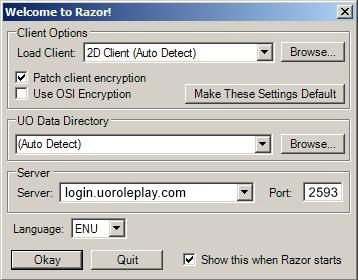
Step 8 – Lastly, launch the game using razor. Make sure to type in the server address like below. Here is a great site for coming up with character names!
Server: login.uoroleplay.com
Port: 2593